
SoloLakehouse -- 开源 Portfolio 项目打包方案
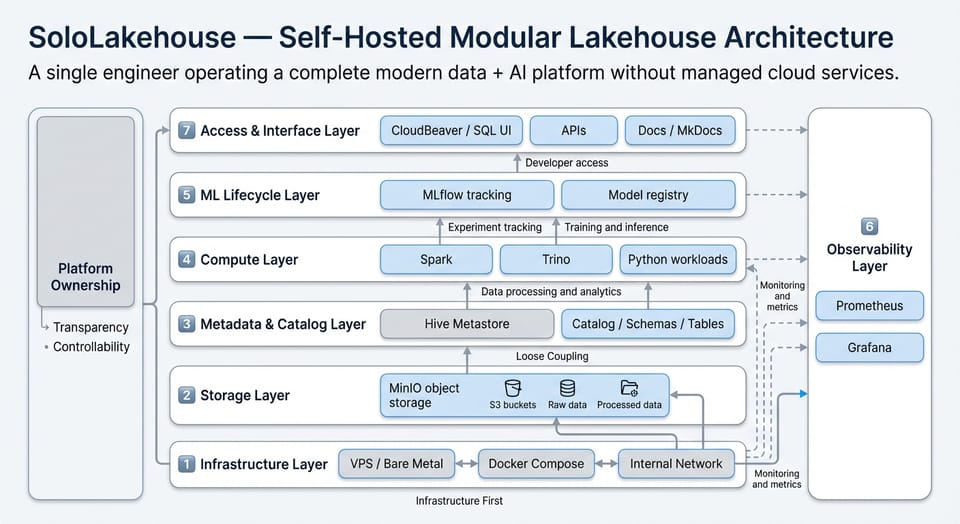
一、定位:这不只是 Side Project,是你的 Platform Engineering 名片
招聘经理视角
一个 100k+ Platform / Data Engineer 候选人需要展示的能力:
| 能力 | 怎么通过这个项目体现 |
|---|---|
| 系统设计 | 架构图 + 组件选型理由 + Trade-off 分析 |
| IaC / 可复现部署 | 一键部署脚本、Terraform、Helm |
| 可观测性 | Prometheus + Grafana 监控全栈 |
| 安全意识 | Secrets 管理、TLS、网络隔离 |
| 文档能力 | 清晰的 README、ADR、运维手册 |
| 端到端思维 | 数据从摄入 → 清洗 → ML → 推理的完整链路 |
项目命名建议
SoloLakehouse 已经很好。标语建议:
SoloLakehouse — A production-ready, open-source Lakehouse platform for small teams.
One command to deploy your own Databricks-like environment.
二、项目结构(开源标准)
sololakehouse/
│
├── README.md                      ← 最重要的文件(见下文)
├── LICENSE                        ← Apache 2.0 推荐
├── ARCHITECTURE.md                ← 架构深度文档
├── CHANGELOG.md
├── Makefile                       ← 一键操作入口
├── .env.example                   ← 环境变量模板(不含真实密码)
│
├── docker-compose.yml             ← 核心:完整平台定义
├── docker-compose.override.yml    ← 开发环境覆盖(可选)
├── docker-compose.monitoring.yml  ← 可拆分的监控栈
│
├── scripts/
│   ├── setup.sh                   ← 首次安装向导
│   ├── health-check.sh            ← 全栈健康检查
│   ├── generate-secrets.sh        ← 自动生成 .env
│   └── demo-data.sh               ← 加载演示数据集
│
├── spark/
│   ├── jars/                      ← .gitignore,README 说明如何下载
│   ├── download-jars.sh           ← 自动下载依赖 JAR
│   └── conf/
│       └── spark-defaults.conf
│
├── trino/
│   └── etc/
│       ├── config.properties
│       └── catalog/
│           ├── iceberg.properties
│           └── hive.properties
│
├── airflow/
│   ├── dags/
│   │   ├── bronze_ingestion.py    ← 示范 DAG
│   │   ├── silver_transform.py
│   │   └── gold_aggregate.py
│   └── plugins/
│
├── notebooks/
│   ├── 01_quickstart.ipynb        ← 交互式 Quickstart
│   ├── 02_medallion_etl.ipynb     ← 端到端 ETL 演示
│   ├── 03_ml_training.ipynb       ← ML + MLflow 演示
│   └── templates/
│       └── spark_session.py
│
├── hive/
│   ├── conf/
│   └── lib/
│
├── monitoring/
│   ├── prometheus/
│   │   └── prometheus.yml
│   └── grafana/
│       └── dashboards/
│           ├── platform-overview.json    ← 预配置看板
│           └── spark-metrics.json
│
├── postgres/
│   ├── pg_hba.conf
│   └── init/
│       └── 01-create-databases.sql      ← 自动创建 airflow/feast DB
│
├── docs/                          ← MkDocs 站点源码
│   ├── mkdocs.yml
│   └── docs/
│       ├── index.md
│       ├── getting-started.md
│       ├── architecture.md
│       ├── components/
│       │   ├── spark.md
│       │   ├── iceberg.md
│       │   ├── trino.md
│       │   └── airflow.md
│       └── adr/                   ← Architecture Decision Records
│           ├── 001-iceberg-over-delta.md
│           ├── 002-trino-over-presto.md
│           └── 003-redpanda-over-kafka.md
│
├── terraform/                     ← Phase 2:云部署
│   ├── aws/
│   │   ├── main.tf
│   │   ├── variables.tf
│   │   ├── outputs.tf
│   │   └── modules/
│   │       ├── vpc/
│   │       ├── ec2/
│   │       └── s3/
│   ├── hetzner/                   ← 便宜的欧洲 VPS(适合你在德国)
│   │   ├── main.tf
│   │   └── cloud-init.yaml
│   └── README.md
│
├── k8s/                           ← Phase 3:Kubernetes 部署(可选)
│   ├── helm/
│   │   └── sololakehouse/
│   │       ├── Chart.yaml
│   │       ├── values.yaml
│   │       └── templates/
│   └── README.md
│
└── tests/
    ├── test_connectivity.py       ← 服务连通性测试
    ├── test_iceberg_rw.py         ← Iceberg 读写测试
    ├── test_etl_pipeline.py       ← DAG 端到端测试
    └── conftest.py
三、Makefile — 一键操作入口
这是开源项目的第一印象,必须让人三步跑起来:
.PHONY: help setup up down status logs test demo clean

COMPOSE = docker compose

help: ## Show this help
	@grep -E '^[a-zA-Z_-]+:.*?## .*$$' $(MAKEFILE_LIST) | sort | \
		awk 'BEGIN {FS = ":.*?## "}; {printf "\033[36m%-20s\033[0m %s\n", $$1, $$2}'

# ============================================================
# 🚀 Quick Start
# ============================================================

setup: ## First-time setup: generate secrets, download JARs, create dirs
	@echo "🔧 Generating environment variables..."
	@bash scripts/generate-secrets.sh
	@echo "📦 Downloading Spark JARs..."
	@bash spark/download-jars.sh
	@echo "📁 Creating data directories..."
	@mkdir -p data/{minio,postgres,spark/events,airflow/logs,jupyter,redpanda,grafana,prometheus,mlflow,hive-metastore/warehouse,cloudbeaver,beszel/{hub,socket,agent},npm/{data,letsencrypt}}
	@mkdir -p logs/npm notebooks airflow/{dags,plugins}
	@echo "✅ Setup complete! Run 'make up' to start."

up: ## Start all services
	$(COMPOSE) up -d
	@echo ""
	@echo "🏠 SoloLakehouse is starting..."
	@echo "   Spark Master UI:  http://localhost:8081"
	@echo "   JupyterLab:       http://localhost:8888"
	@echo "   Airflow:          http://localhost:8085"
	@echo "   Trino:            http://localhost:8080"
	@echo "   CloudBeaver:      http://localhost:8978"
	@echo "   MLflow:           http://localhost:5000"
	@echo "   Grafana:          http://localhost:3000"
	@echo "   MinIO Console:    http://localhost:9001"
	@echo ""
	@echo "⏳ Services may take 30-60s to fully initialize."

down: ## Stop all services
	$(COMPOSE) down

restart: ## Restart all services
	$(COMPOSE) down && $(COMPOSE) up -d

# ============================================================
# 📊 Operations
# ============================================================

status: ## Show service status
	$(COMPOSE) ps --format "table {{.Name}}\t{{.Status}}\t{{.Ports}}"

logs: ## Tail logs (usage: make logs s=spark-master)
	$(COMPOSE) logs -f $(s)

health: ## Run health check on all services
	@bash scripts/health-check.sh

# ============================================================
# 🎯 Demo & Testing
# ============================================================

demo: ## Load demo dataset and run sample pipeline
	@echo "📊 Loading NYC Taxi demo dataset..."
	@bash scripts/demo-data.sh
	@echo "✅ Demo data loaded! Open JupyterLab to explore."

test: ## Run integration tests
	@echo "🧪 Running connectivity tests..."
	python -m pytest tests/ -v

# ============================================================
# 🧹 Maintenance
# ============================================================

clean: ## Remove all data volumes (DESTRUCTIVE!)
	@echo "⚠️  This will delete ALL data. Press Ctrl+C to cancel."
	@sleep 5
	$(COMPOSE) down -v
	rm -rf data/

spark-sql: ## Open Spark SQL shell
	$(COMPOSE) exec spark-master spark-sql

trino-cli: ## Open Trino CLI
	$(COMPOSE) exec trino trino
四、scripts/generate-secrets.sh
#!/bin/bash
set -euo pipefail

ENV_FILE=".env"
EXAMPLE_FILE=".env.example"

if [ -f "$ENV_FILE" ]; then
    echo "⚠️  .env already exists. Skipping generation."
    echo "   Delete .env and re-run to regenerate."
    exit 0
fi

echo "🔐 Generating secrets..."

# 生成随机密码的函数
gen_password() { openssl rand -base64 24 | tr -d '/+=' | head -c 24; }
gen_hex() { openssl rand -hex 32; }
gen_fernet() { python3 -c "from cryptography.fernet import Fernet; print(Fernet.generate_key().decode())" 2>/dev/null || echo "REPLACE_ME_WITH_FERNET_KEY"; }

cat > "$ENV_FILE" << EOF
# ====================================
# SoloLakehouse Environment Variables
# Generated on $(date -u +"%Y-%m-%dT%H:%M:%SZ")
# ====================================

# ---- MinIO ----
MINIO_ROOT_USER=admin
MINIO_ROOT_PASSWORD=$(gen_password)

# ---- PostgreSQL ----
PG_PASSWORD=$(gen_password)

# ---- Grafana ----
GRAFANA_ADMIN_PASSWORD=$(gen_password)

# ---- Jupyter ----
JUPYTER_TOKEN=$(gen_hex)

# ---- Airflow ----
AIRFLOW_FERNET_KEY=$(gen_fernet)
AIRFLOW_SECRET_KEY=$(gen_hex)
AIRFLOW_ADMIN_PASSWORD=$(gen_password)
EOF

echo "✅ .env generated. Review it before starting: cat .env"
五、scripts/health-check.sh
#!/bin/bash
set -uo pipefail

RED='\033[0;31m'
GREEN='\033[0;32m'
YELLOW='\033[1;33m'
NC='\033[0m'

check() {
    local name=$1 url=$2
    if curl -sf --connect-timeout 5 "$url" > /dev/null 2>&1; then
        echo -e "  ${GREEN}✓${NC} $name"
    else
        echo -e "  ${RED}✗${NC} $name ($url)"
    fi
}

echo ""
echo "🏥 SoloLakehouse Health Check"
echo "━━━━━━━━━━━━━━━━━━━━━━━━━━━━"

echo ""
echo "Storage:"
check "MinIO"           "http://localhost:9000/minio/health/live"

echo ""
echo "Compute:"
check "Spark Master"    "http://localhost:8081"
check "Trino"           "http://localhost:8080/v1/info"

echo ""
echo "Notebook & IDE:"
check "JupyterLab"      "http://localhost:8888/api/status"
check "CloudBeaver"     "http://localhost:8978"

echo ""
echo "Orchestration:"
check "Airflow"         "http://localhost:8085/health"

echo ""
echo "ML Platform:"
check "MLflow"          "http://localhost:5000/health"

echo ""
echo "Monitoring:"
check "Prometheus"      "http://localhost:9090/-/healthy"
check "Grafana"         "http://localhost:3000/api/health"

echo ""
六、README.md — 最重要的文件
# 🏠 SoloLakehouse
**A production-ready, open-source Lakehouse platform you can deploy in minutes.**
One-command deployment of a complete Databricks-like environment built on
Apache Spark, Iceberg, Trino, Airflow, MLflow, and more.

## Why SoloLakehouse?
Databricks is powerful but expensive. SoloLakehouse gives small teams and
individual engineers a self-hosted alternative with:
- 🔥 **Apache Spark** cluster for distributed computing
- 🧊 **Apache Iceberg** tables with ACID transactions and time travel
- ⚡ **Trino** for interactive SQL analytics
- 📓 **JupyterLab** with PySpark pre-configured
- 🔄 **Airflow** for workflow orchestration (Medallion ETL)
- 🧪 **MLflow** for experiment tracking and model registry
- 📊 **Grafana + Prometheus** for full-stack monitoring
- 🔐 **Nginx Proxy Manager** with auto TLS
## Quick Start
```bash
git clone https://github.com/yourusername/sololakehouse.git
cd sololakehouse
make setup # Generate secrets, download JARs
make up # Start all 15+ services
make demo # Load sample dataset
Open http://localhost:8888 for JupyterLab.
Architecture
┌─────────────────────────────────────────────────────┐
│                  Nginx Proxy Manager                │
│              (TLS termination + routing)             │
└────────┬──────────┬──────────┬──────────┬───────────┘
         │          │          │          │
    JupyterLab  CloudBeaver  Airflow   MLflow    ...
         │          │          │          │
┌────────┴──────────┴──────────┴──────────┴───────────┐
│  Spark Master + Workers    │    Trino (SQL Engine)   │
├────────────────────────────┼─────────────────────────┤
│         Apache Iceberg (Table Format, ACID, TTL)     │
├────────────────────────────┼─────────────────────────┤
│   Hive Metastore (Catalog) │   PostgreSQL (Backend)  │
├──────────────────────────────────────────────────────┤
│              MinIO (S3-compatible Object Storage)     │
│     s3://warehouse/  s3://raw/  s3://mlflow/         │
└──────────────────────────────────────────────────────┘
Components
| Layer | Component | Purpose |
|---|---|---|
| Storage | MinIO | S3-compatible object storage |
| Table Format | Apache Iceberg | ACID, time travel, schema evolution |
| Catalog | Hive Metastore | Table metadata management |
| Compute | Apache Spark 3.5 | Distributed data processing |
| SQL | Trino 455 | Interactive analytics |
| Notebook | JupyterLab | Interactive development |
| Orchestration | Apache Airflow | Workflow scheduling |
| ML | MLflow | Experiment tracking + model registry |
| Streaming | Redpanda | Kafka-compatible event streaming |
| Monitoring | Prometheus + Grafana | Metrics and dashboards |
Documentation
Full docs: https://docs.sololake.space
Roadmap
- [x] Core Lakehouse (Spark + Iceberg + Trino + MinIO)
- [x] Notebook environment (JupyterLab)
- [x] Workflow orchestration (Airflow + Medallion ETL)
- [x] ML platform (MLflow)
- [x] Full-stack monitoring (Prometheus + Grafana)
- [ ] Terraform deployment (Hetzner / AWS)
- [ ] Kubernetes Helm chart
- [ ] Apache Gravitino (Unity Catalog alternative)
- [ ] Feature Store (Feast)
- [ ] Model serving endpoint
License
Apache License 2.0
---

## 七、Architecture Decision Records (ADR) — 面试加分项

这是高级工程师区别于初级的关键。每个技术选型写一个 ADR:

### `docs/docs/adr/001-iceberg-over-delta.md`

```markdown
# ADR 001: Apache Iceberg over Delta Lake

## Status: Accepted

## Context
We need an open table format for our Lakehouse. The main candidates
are Apache Iceberg, Delta Lake, and Apache Hudi.

## Decision
We chose Apache Iceberg.

## Rationale
1. **Multi-engine support**: Our architecture uses both Spark and
   Trino. Iceberg has first-class support in Trino, while Delta Lake
   requires a compatibility layer.
2. **Vendor neutrality**: Delta Lake is governed by Databricks.
   Iceberg is an Apache project with broader community governance.
3. **Hidden partition evolution**: Iceberg's partition spec can evolve
   without rewriting data — critical for schema changes in production.
4. **Catalog pluggability**: Iceberg supports Hive, REST, JDBC, and
   Gravitino catalogs, making future migration easier.

## Trade-offs
- Delta Lake has better Spark-native integration and simpler setup
- Delta Lake's OPTIMIZE and Z-ORDER are more mature
- Iceberg's REST catalog ecosystem is still evolving

## Consequences
- Trino can read/write the same tables as Spark without extra config
- We need Iceberg JARs in both Spark and Trino classpaths
- Future migration to Gravitino catalog will be straightforward
八、Terraform 部署(Phase 2)
Hetzner Cloud(推荐,欧洲便宜 VPS)
terraform/hetzner/main.tf:
terraform {
  required_providers {
    hcloud = {
      source  = "hetznercloud/hcloud"
      version = "~> 1.45"
    }
  }
}

variable "hcloud_token" {
  sensitive = true
}

variable "ssh_public_key" {
  description = "SSH public key for server access"
}

provider "hcloud" {
  token = var.hcloud_token
}

# SSH Key
resource "hcloud_ssh_key" "default" {
  name       = "sololakehouse"
  public_key = var.ssh_public_key
}

# Firewall
resource "hcloud_firewall" "lakehouse" {
  name = "sololakehouse-fw"

  rule {
    direction  = "in"
    protocol   = "tcp"
    port       = "22"
    source_ips = ["0.0.0.0/0", "::/0"]
  }
  rule {
    direction  = "in"
    protocol   = "tcp"
    port       = "80"
    source_ips = ["0.0.0.0/0", "::/0"]
  }
  rule {
    direction  = "in"
    protocol   = "tcp"
    port       = "443"
    source_ips = ["0.0.0.0/0", "::/0"]
  }
}

# Server
resource "hcloud_server" "lakehouse" {
  name        = "sololakehouse"
  server_type = "cpx41"          # 8 vCPU, 16 GB RAM, €28/mo
  image       = "ubuntu-24.04"
  location    = "fsn1"           # Falkenstein, Germany
  ssh_keys    = [hcloud_ssh_key.default.id]
  firewall_ids = [hcloud_firewall.lakehouse.id]

  user_data = file("cloud-init.yaml")
}

# Volume for persistent data
resource "hcloud_volume" "data" {
  name     = "sololakehouse-data"
  size     = 100                 # GB
  server_id = hcloud_server.lakehouse.id
  automount = true
  format    = "ext4"
}

output "server_ip" {
  value = hcloud_server.lakehouse.ipv4_address
}
terraform/hetzner/cloud-init.yaml:
#cloud-config
package_update: true
packages:
  - docker.io
  - docker-compose-v2
  - git
  - make

runcmd:
  - systemctl enable --now docker
  - usermod -aG docker ubuntu
  - cd /opt && git clone https://github.com/yourusername/sololakehouse.git
  - cd /opt/sololakehouse && make setup && make up
九、Portfolio 展示策略
GitHub 仓库必须包含:
| 元素 | 为什么重要 |
|---|---|
| README 有架构图 | 招聘经理 30 秒内决定是否继续看 |
| 一键部署能跑 | 证明你做的东西是真的 |
| ADR 文档 | 证明你能做技术决策,不只是拼凑 |
| Demo Notebook | 可视化展示端到端能力 |
| CI/CD (GitHub Actions) | 自动测试 docker-compose 能启动 |
| Star / 贡献者 | 社交证明(可以在论坛推广) |
简历 / LinkedIn 上怎么写
SoloLakehouse — Open-Source Lakehouse Platform
━━━━━━━━━━━━━━━━━━━━━━━━━━━━━━━━━━━━━━━━━━━━━
Designed and built a production-ready, self-hosted alternative to
Databricks, orchestrating 15+ services (Spark, Iceberg, Trino,
Airflow, MLflow) on Docker with one-command deployment.

• Implemented Medallion architecture (Bronze → Silver → Gold)
  with Apache Iceberg ACID tables on MinIO object storage
• Built end-to-end ML pipeline: data ingestion → feature
  engineering → training → experiment tracking → model registry
• Provisioned cloud infrastructure via Terraform (Hetzner Cloud)
  with automated TLS, monitoring (Prometheus/Grafana), and
  health checks
• Published as open-source project with comprehensive ADRs,
  documentation site (MkDocs), and integration test suite

Tech: Spark, Iceberg, Trino, Airflow, MLflow, Docker, Terraform,
     PostgreSQL, MinIO, Prometheus, Grafana, Python
面试中怎么讲
准备好回答这些问题:
- "Why Iceberg over Delta Lake?" → 指向你的 ADR
- "How would you scale this?" → Docker Swarm → K8s 演进路径
- "What was the hardest part?" → 跨引擎 catalog 一致性
- "How do you monitor it?" → 展示 Grafana 看板截图
- "What would you change?" → 展示你知道 trade-offs
十、时间线与优先级
| 阶段 | 内容 | 时间 | 对 100k+ 影响 |
|---|---|---|---|
| Phase 1 | 补齐 Spark + Iceberg + Jupyter + Airflow | 2 周 | ⭐⭐⭐⭐ |
| Phase 2 | 打包开源:Makefile + scripts + README + ADR | 1 周 | ⭐⭐⭐⭐⭐ |
| Phase 3 | Terraform Hetzner 部署 | 1 周 | ⭐⭐⭐⭐ |
| Phase 4 | Demo Notebook + MkDocs 文档站 | 1 周 | ⭐⭐⭐ |
| Phase 5 | K8s Helm Chart(可选) | 2 周 | ⭐⭐⭐ |
| Phase 6 | 在 Reddit/HN/LinkedIn 推广获 Star | 持续 | ⭐⭐⭐⭐⭐ |
Phase 2 是 ROI 最高的。一个包装精良、文档完善的开源项目, 比一个功能更多但 README 只有三行的项目值 10 倍。